

The Constant Evolution of WhatsApp Customization
In the competitive landscape of instant messaging, WhatsApp has long maintained its dominance by prioritizing utility over vanity. However, the recent introduction of the new Profile Tab for iOS users signals a shift in Meta’s strategy. As reported by 9to5Mac and various beta testers, this update isn’t just a minor cosmetic tweak; it is a fundamental reorganization of how users interact with their personal settings and professional presence within the app.
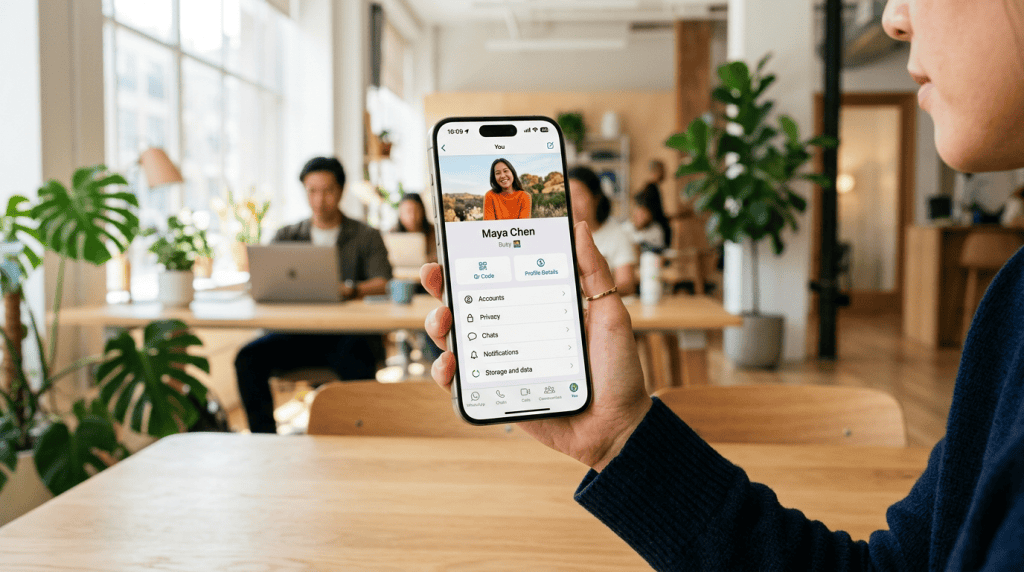
For years, the “Settings” tab was a static list of menus. With the rollout of the new Profile Tab, WhatsApp is bringing the user’s identity to the forefront. By consolidating profile pictures, name settings, and status updates into a unified, visually driven interface, the app is moving closer to the design language of its sibling platforms, Instagram and Facebook. This change acknowledges a growing trend: messaging apps are no longer just for text; they are digital business cards and social hubs.
What Exactly is the New Profile Tab?
The core of the update revolves around the “You” tab, which replaces the traditional “Settings” icon at the bottom right of the iOS interface. Upon tapping this tab, users are greeted with their profile picture and a redesigned layout that prioritizes navigation. Instead of digging through sub-menus to change a privacy setting or view a linked device, the new architecture uses a more “card-like” design to categorize information.
This update also integrates several shortcuts that were previously buried. For instance, the QR code for sharing your contact information is now more prominent, acknowledging the physical-world use cases of WhatsApp in retail and networking. The integration is seamless, staying true to the sleek, minimalist aesthetic that iOS users expect while providing more “breathing room” for each setting category.
Why the Move Toward ‘Instagram-ification’ Matters
Market analysts have noted that Meta is increasingly looking to unify the user experience across all its apps. By making the WhatsApp profile tab feel familiar to an Instagram user, Meta lowers the friction for users who switch between apps constantly. This “Instagram-ification” isn’t just about looks—it’s about behavior. WhatsApp wants you to spend more time “managing” your profile, much like you would a social media bio.
Furthermore, internal data suggests that as WhatsApp Business continues to grow, clear and professional profiles are essential. The new tab makes it easier for entrepreneurs to ensure their business details are updated and visible. By making the profile the central hub of the app experience, WhatsApp is positioning itself as more than just a green bubble; it is a comprehensive communication platform.
Technical Enhancements and User Experience
Beyond the visual overhaul, the update brings under-the-hood performance improvements for iOS users. Testing indicates that the transition between the chat list and the new Profile Tab is smoother, with reduced latency. This is part of WhatsApp’s broader “Project Lightspeed” philosophy—optimizing the app to keep it fast even as they add more features like HD video sharing and screen-sharing during calls.
iOS users will also notice better integration with system-wide features. For example, the profile tab makes better use of the iPhone’s high-resolution displays and haptic feedback. When navigating through privacy settings or account security options, the tactile response feels more integrated into the iOS ecosystem, providing a premium feel that was lacking in older versions of the app.
Privacy and Security in the New Layout
With any major interface change, privacy concerns typically follow. WhatsApp has been careful to ensure that the new Profile Tab doesn’t obscure critical security features. In fact, the “Privacy” settings are now arguably more accessible. Users can quickly audit who sees their “Last Seen,” “Profile Photo,” and “About” info directly from the new hub.
One notable addition is the improved visibility of the “End-to-End Encryption” status indicators. As governments worldwide debate the merits of encrypted messaging, Meta is double-downing on transparently showing users that their data is protected. The new layout includes clearer paths to two-step verification and account security alerts, ensuring that while the app looks new, the core mission of secure communication remains unchanged.
Rolling Out to the Masses: What to Expect
While the feature has been in beta for some time, it is currently rolling out to the general public via the App Store. If you don’t see the “You” tab yet, it’s likely due to the staged rollout approach Meta typically employs. Users are encouraged to keep their app updated to the latest version of WhatsApp for iOS (typically version 24.x and above).
As we look forward, this profile tab update is likely just the foundation. Rumors suggest that WhatsApp is working on “Username” support, which would allow users to connect without sharing their phone numbers. If that feature launches, the new Profile Tab will be the essential home for managing those digital identities. For now, iOS users can enjoy a cleaner, more modern, and more personalized way to navigate the world’s most popular messaging app.

 English